Docs / Bottom bars / 13
PeakBottomBar
Floating pill whose selected icon lifts over its label, with a peaked strip that stretches from tab to tab.
Preview

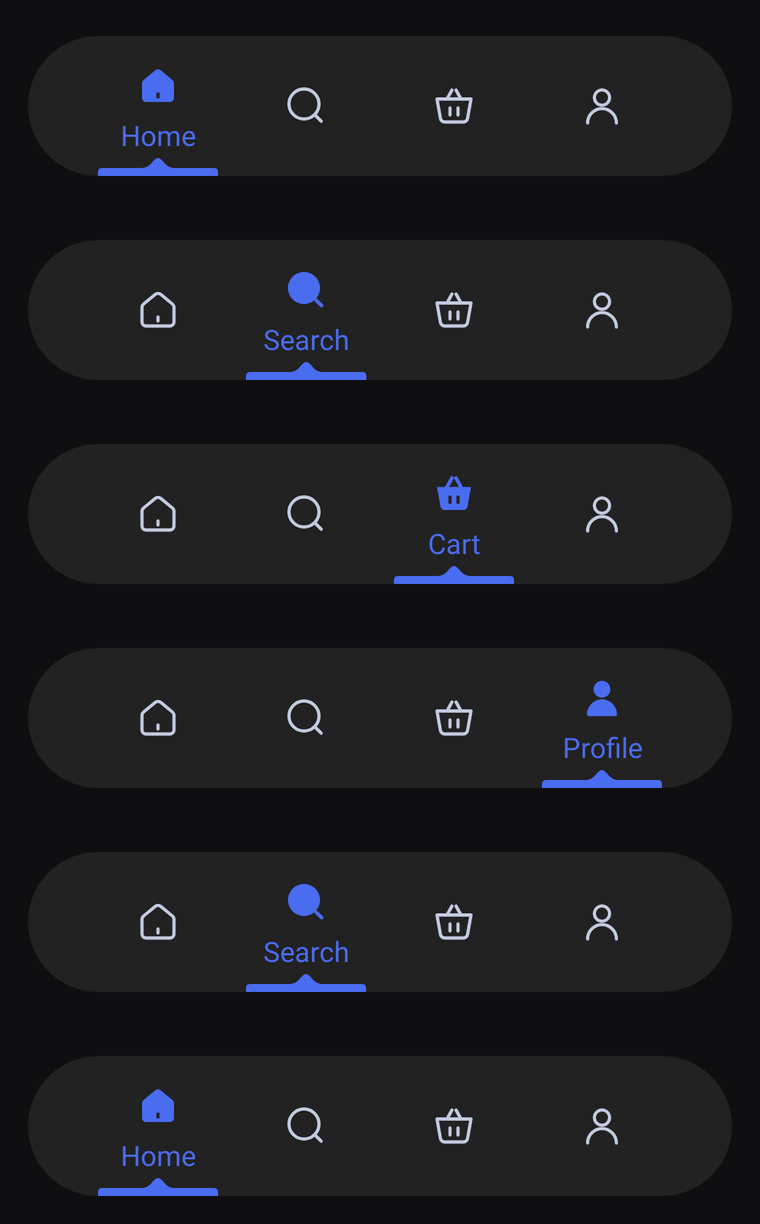
A floating pill of icon-only tabs. The selected icon lifts and fills in over its label, and an accent strip with a small peak in its middle sits on the bottom edge under it, stretching as it slides from tab to tab.
Usage
PeakBarItem has no center item: any tab can be selected, and every slot gets the same width. The bar only shows icons until a tab is selected; the selected one switches to its selectedIcon, lifts it and shows its label underneath. The rest of the time label is read out by TalkBack.
import com.nameisjayant.bottombar.peak.PeakBarItem
import com.nameisjayant.bottombar.peak.PeakBottomBar
import com.nameisjayant.bottombar.peak.PeakBottomBarDefaultsval items = listOf(
PeakBarItem("Home", Icons.Outlined.Home, Icons.Filled.Home),
PeakBarItem("Wallet", Icons.Outlined.AccountBalanceWallet, Icons.Filled.AccountBalanceWallet),
PeakBarItem("Analysis", Icons.Outlined.PieChart, Icons.Filled.PieChart),
PeakBarItem("Profile", Icons.Outlined.Person, Icons.Filled.Person),
)
PeakBottomBar(
items = items,
selectedIndex = selectedIndex,
onItemClick = { selectedIndex = it },
// The bar is a floating pill, so keep it off the screen edges.
modifier = Modifier.padding(horizontal = 16.dp, vertical = 12.dp),
)Sizing and behavior
The bar is BarHeight (70dp) tall with fully rounded ends. The strip under the selected tab is IndicatorWidth (60dp) wide and IndicatorThickness (4dp) thick, with a PeakWidth (16dp) peak rising PeakHeight (5dp) from its middle. When the selection changes, the end of the strip facing the new tab moves first and the other end catches up, so the strip stretches on the way and settles back to size. The outline is convex, so shadowElevation works on every API level.
Colors
Colors come from PeakBottomBarDefaults.colors(darkTheme), lightColors(...) and darkColors(...). Start from either palette and override only what you need.
| Color | Used for |
|---|---|
containerColor | The bar background |
indicatorColor | The peaked strip under the selected tab |
selectedContentColor | Icon and label of the selected tab (defaults to indicatorColor) |
unselectedContentColor | Icons of the other tabs |
PeakBottomBar(
    items = items,
    selectedIndex = selectedIndex,
    onItemClick = { selectedIndex = it },
    // Follow your app's theme instead of the system one.
    colors = PeakBottomBarDefaults.colors(darkTheme = isDarkTheme),
)
API
The full signature of the composable and its item class:
fun PeakBottomBar(
    items: List<PeakBarItem>,
    selectedIndex: Int,
    onItemClick: (index: Int) -> Unit,
    modifier: Modifier = Modifier,
    colors: PeakBottomBarColors = PeakBottomBarDefaults.colors(),
    labelStyle: TextStyle = PeakBottomBarDefaults.LabelStyle,
    shadowElevation: Dp = 0.dp,
    windowInsets: WindowInsets = PeakBottomBarDefaults.windowInsets,
)

class PeakBarItem(
    val label: String,
    val icon: ImageVector,
    val selectedIcon: ImageVector = icon,
)