Ask for a rating without leaving your app.
A tiny, typed TurboModule over Google Play In-App Review and Apple's SKStoreReviewController. Three functions, nothing to configure.
npm install @nameisjayant/react-native-in-app-review
Why this library
Small surface, native behaviour, honest about what the stores allow.
Three functions
isAvailable, requestReview, openStoreListing. That's the whole API.
Truly native
Google Play In-App Review on Android and SKStoreReviewController on iOS.
New Architecture
A TurboModule built with codegen, so there's no bridge overhead.
Fully typed
Promise-based, with a typed InAppReviewErrorCode union for every rejection.
Graceful fallback
A "Rate us" helper that opens the store's write-review page on both platforms.
Web safe
Imports cleanly on web, where isAvailable() simply returns false.
Installation
Autolinking handles the rest. No permissions, no manifest edits, no Info.plist keys.
npm install @nameisjayant/react-native-in-app-reviewyarn add @nameisjayant/react-native-in-app-reviewThen install the iOS pods:
cd ios && pod installUsing Expo? This library contains native code, so it runs in a development build, not in Expo Go.
Requirements
| Platform | Minimum |
|---|---|
| React Native | New Architecture enabled |
| Android | minSdkVersion 24, with the Google Play Store on the device |
| iOS | React Native's minimum supported iOS version |
Quick start
Ask after a happy moment, and give users a "Rate us" button they can always find.
import {
  isAvailable,
  requestReview,
  openStoreListing,
} from '@nameisjayant/react-native-in-app-review';

// 1. After a happy moment: finished a level, saved a document, hit a streak…
async function onLevelComplete() {
  if (await isAvailable()) {
    try {
      await requestReview();
    } catch (error) {
      console.warn((error as { code?: string }).code);
    }
  }
  // Carry on with your flow either way.
}

// 2. From an explicit "Rate us" button in Settings
function RateUsButton() {
  return (
    <Button
      title="Rate us"
      onPress={() => openStoreListing({ iosAppId: '1234567890' })}
    />
  );
}
API
Every function returns a promise. Rejections carry a typed error.code.
isAvailable(): Promise<boolean>
Whether the native prompt can be requested on this device.
| Platform | Returns |
|---|---|
| Android | true when the Google Play Store is installed |
| iOS | Always true |
| Web | Always false |
requestReview(): Promise<void>
Asks the store to show its in-app review prompt: Google Play In-App Review on Android, SKStoreReviewController on iOS.
- Android resolves once the review flow has finished.
- iOS resolves once the request has been handed to StoreKit.
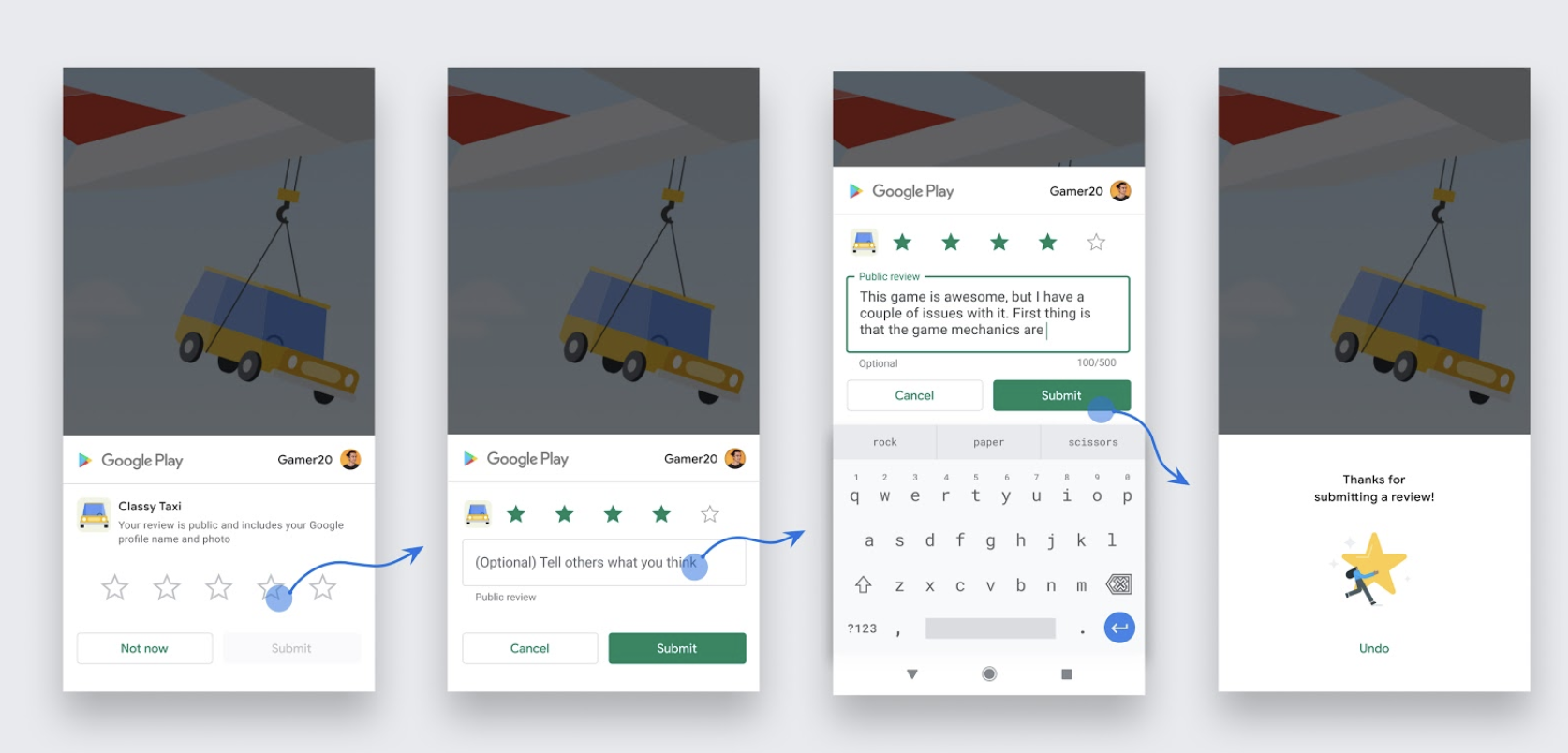
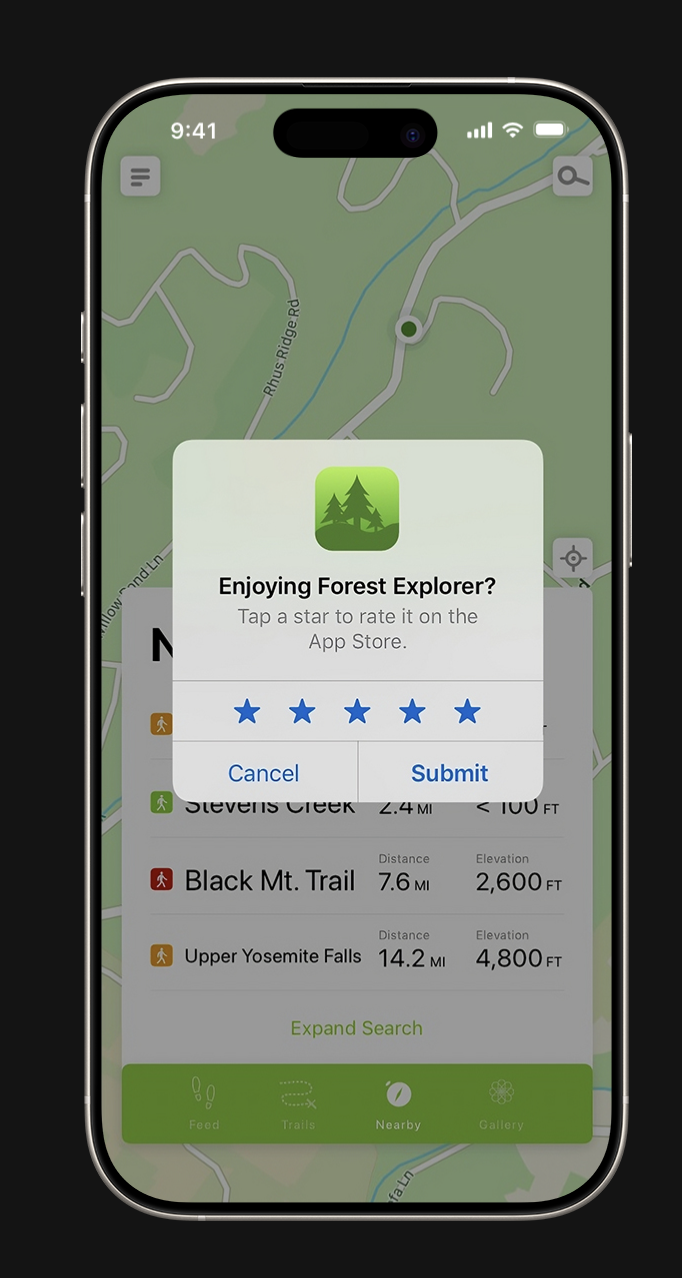
SKStoreReviewController rating promptNeither store tells you whether the prompt was shown or a review was submitted, and both enforce quotas. iOS shows it at most 3 times in 365 days, and Google Play applies its own time-bound quota. A resolved promise only means the request finished.
- Call it after a positive moment, once the user has had time to enjoy your app.
- Continue your flow the same way whether it resolves or rejects.
- Call it from a button, because the prompt may not appear. Use
openStoreListing(). - Ask a leading question first, like "Do you like the app?". Both stores discourage it.
openStoreListing(options?): Promise<void>
Opens your app's store page so the user can write a review. Safe to call from a button.
| Option | Platform | Description |
|---|---|---|
iosAppId | iOS | Numeric App Store ID, required on iOS. Opens apps.apple.com/app/id<ID>?action=write-review. |
androidPackageName | Android | Defaults to the running app's package. Opens the Play Store app, or the Play website if it's missing. |
await openStoreListing({
  iosAppId: '1234567890',
  androidPackageName: 'com.example.app', // optional
});
Types
import type {
  InAppReviewErrorCode,
  StoreListingOptions,
} from '@nameisjayant/react-native-in-app-review';

interface StoreListingOptions {
  iosAppId?: string;           // required on iOS
  androidPackageName?: string; // defaults to the running app
}
Error codes
Every rejection carries an error.code, exported as the InAppReviewErrorCode type.
| Code | Platform | Meaning |
|---|---|---|
NO_ACTIVITY | Android | No foreground activity to attach the flow to. |
REVIEW_IN_PROGRESS | Android | requestReview() was called while a flow is still running. |
PLAY_STORE_NOT_FOUND | Android | The Play Store is missing or unofficial. |
INVALID_REQUEST | Android | Play rejected the request. |
INTERNAL_ERROR | Android | Unexpected Play Store error. |
NO_WINDOW_SCENE | iOS | No foreground window scene to present in. |
MISSING_APP_ID | iOS | openStoreListing() was called without a numeric iosAppId. |
OPEN_URL_FAILED | Both | The store page could not be opened. |
UNSUPPORTED | Web | No native review prompt on this platform. |
UNKNOWN | Android | Any other failure. |
Testing the prompt
The stores decide when the dialog appears, so where you test matters.
Android
The dialog only appears for apps installed from Google Play. Use internal app sharing or an internal test track. A sideloaded debug build completes the flow without showing anything.
iOS
- Development
- Always shown, never submitted.
- TestFlight
- Never shown.
- App Store
- StoreKit applies its quota.
The example/ app wires up all three functions. Run it with yarn example android or yarn example ios.
Contributing
Contributions are welcome. Please read the guides before opening a pull request.
Development workflow · Sending a pull request · Code of conduct